


How much does a fresh windows install help performance?
CORRECTION: 0:15 – THE CLEAN SSD IS a SAMSUNG 860* EVO
I have 9 Games to benchmark and 4 CPU benchmarks. All of these benchmarks are in 1080p, with overall comparisons given at the end of the video. I will compare a fresh clean windows install performance compared to a used ‘dirty’ windows install.
-
- DLSS is off
- CPU and GPU are stock, with no overclock
- Games tested in Fullscreen
- Vsync is off
- Nvidia Low Latency is off, but if it’s turned on, I will let you know on the graph.
- Frame rate uncapped
- Ray Tracing is off
- REBar is On
- All Games Benchmarked on a 3-game Average (EXCEPT FOR CINEBENCH 2024 WHICH IS USING A 1 RUN AVERAGE)
- Nvidia Driver Tested on: 561.09 – 1/09/2024 (DD/MM/YY)
- Latest Windows Update 22H2
- Same BIOS Settings on All Tests
Test system(my system):
CPU: AMD Ryzen 5 5600 Stock
AIO: Arctic Liquid Freezer III 360mm
GPU: ZOTAC GeForce RTX 3070 Twin Edge OC 8GB LHR Stock
SSD: Samsung 990 Pro 2TB (USED), 860 EVO 500gb(CLEAN)
HDD: Seagate 500gb, 4x 1tb Samsung, 2tb Western Digital Green, 4tb Seagate IronWolf Nas
Ram: 32GB Patriot Viper CL18 DDR4 4000
Ram Cooler xD: Jonsbo NF-1 (Only used with Patriot Viper Kit)
Motherboard: Gigabyte Aorus Master B550 PSU: Corsair RM750x Gold 750w
Case: Corsair 5000D Airflow
Fans: 3x Inwin Sirius Loop ASL120 120mm (Intake), 3x Fractal Design Prisma AL-12 120mm (Intake), 1x Silverstone Air Blazer 120R 120mm (Exhaust), 2x Random Corsair 120mm fans (Intake on bottom).
Here is the video of Clean ‘Fresh’ Install Windows Install v Dirty ‘Used’ Install:

Graphs of the Games – Hover to see the Names of Games:


Both of the clean and used installs played out basically the same on average fps, being only a 1.26% difference; however, the 1% lows were the largest uplift out of any game at a 14% difference.

The clean install had a small increase, from 113.03 FPS compared to 112.53 FPS on the dirty install, a difference of only 0.44%. However, the 1% lows saw a more noticeable difference, with the clean install performing better at 80.30 FPS compared to 76.67 FPS. Again pretty similar performance in terms of average fps.
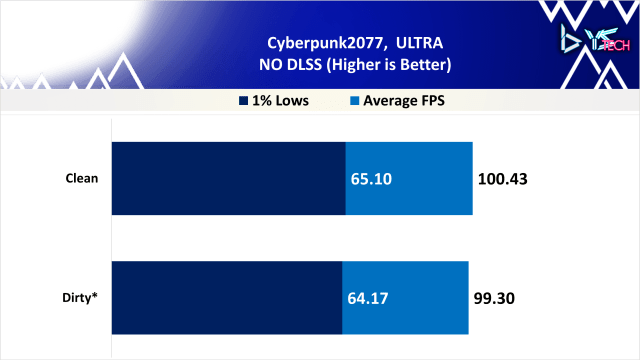
The clean install was basically the same dirty install. Average FPS increased by 1.14%, from 99.30 to 100.43. Similarly, 1% lows improved by 1.45%, from 64.17 to 65.10. They are basically the same in terms of performance. here.


Next is Hitman 3, and the clean install saw a slight improvement. Average FPS increased by 5.93%, from 169.40 to 179.43. The 1% lows also saw a nice jump, going from 117.03 to 132.63.

Hogwarts Legacy had the dirty install actually perform a lot better in 1% lows. The dirty install was at 49.57 FPS compared to 26.33 FPS on the clean install for 1% lows. Thats a 61% difference on 1% lows. The average FPS showed only a minor difference, with the clean install at 71.83 FPS and the dirty install at 74.47 FPS, a 3.67% higher average for the dirty install. I’m not too sure what to make of this title anymore; it seems to me like Hogwarts Legacy is just annoying to run.

The performance here was basically the same on both benchmarks with the 1% lows being better on the clean install with 87.07fps compared to the dirty installs 84.27fps. Both the average and 1% lows fps show a really small %difference between the clean and dirty windows installs.

Ratchet and Clank Rift Apart had the dirty install perform slightly better in 1% lows, with 69.00 FPS compared to 66.53 FPS on the clean install; a really small 3.71% improvement. However, the average FPS was nearly identical, with the clean install at 95.07 FPS and the dirty install at 94.33 FPS, only a 0.78% difference.


The clean install showed a slight improvement over the dirty install. The clean install had an average FPS of 144.27 compared to 143.27 on the dirty install, a minimal 0.70% increase. Even the 1% lows improvement on the clean install is only 5.03%


Last is The Callisto Protocol; as you can see, both the clean and dirty Windows installs basically played out the same here. The improvement to the clean install was under 1% for both of the installs.
Graphs of the CPU Benchmarks – Hover to see the Names:


For the first CPU benchmark, we have 3DMark Timespy extreme. On the fresh windows install we got a CPU score of 4065.67 on a three run average compared to the used Windows install of 3974. This is a % difference of 2% which isn’t too much higher and really doesn’t show much of a difference between the clean and dirty windows installs.


On the 7ZIP benchmark I am taking the decompression results and the clean drive score was 7.03points above the dirty drive score which was a bit higher. Whilst both PC’s had programs on the taskbar closed as shown here, there are most likely lingering programs that inhibit performance on the used windows drive.

Even with the Blender benchmark we are seeing a similar trend with the Clean drive performing slightly better by about 5.79%. Not too much to say here but the increase in performance is nice.

Cinebench 2024 is up, and I have to note that this is done just on a one-run average only; all of the other benchmarks are done on a three-run average.
Like cinebench the %difference was a little bit higher at 7% which is a decent uplift over the used dirty windows drive.
Graphics Settings in Game – Hover to see the Names of Games:


Graphs of the Overall %Differences for Average FPS and Average 1% Lows:


- On the CPU benchmarks there slight improvement in performance for all benchmarks on the clean windows install with the highest being 7ZIP at a 8% difference. Overall the clean drive was 7% faster on average compared to the used dirty windows drive.

- The average FPS had an admiral attempt at improving with the clean drive being about 7% faster than the used install. Notably, hitman 3 had a 6% performance difference and also improved in 1% lows, as you will see soon. Unfortunately, the mode for this data set is 1, and as you can see, 6 games here only had a difference between 0 and 2%, so there is not much of an improvement. We have hogwarts legacy, both in the average and 1% lows, and they are performing worse on the clean windows install.

- Now Hogwarts Legacy on the 1% lows did produce some problems for the clean windows install at a 61% difference compared to the used drive. If I include this result than the Clean drive was 2% slower on the 1% lows.

- But if I remove it from the graph and only have the 8 games than the clean drive was 10% faster on average compared to the used dirty windows install. Now Ratchet and Clank Rift Rift Apart is the only other title which had worse performance on the clean drive for 1% lows being a 4% difference.
Some Final Thoughts:
- Most of the games being 6 of out 9 had a % difference between 0 and 2% for average FPS. However we can see that the 1% lows had a nice uplift on the clean drive. So, there was not too much of an improvement in average fps, but the 1% lows had a decent uplift.
- While the average FPS on most games didn’t improve too much, the 1% lows did improve on the clean Windows install.
- It was interesting that all four CPU benchmarks benefited from the clean Windows install, which could show how day-to-day tasks become slower over time on a dirty Windows install. That’s not to say that this is solid evidence, but it gives an indication.
- The truth, though, is that for day-to-day tasks, if you are experiencing lag on Windows, one of the easiest things to do is to do a fresh, clean installation to see if you really need to upgrade any component on your PC.
YSTech: https://ystech.org
YSTech Article: https://ystech.org/clean-windows-install-v-used-install
-YS